A clear start time for an online poker tournament exists; however, as this time is converted to a player’s local time zone in the U.S., it is likely to be different from that of other players who live in a variety of cities including Miami, Chicago, Denver and Los Angeles. Therefore, careful time conversions are necessary when preparing for tournaments.
The Event Time in Your Area Depends on the Clocks Used by Other People
In addition to Eastern, Central, Mountain, and Pacific time zones; during almost all of the calendar year, every adjacent time zone will be one hour away from the other. For example, an event scheduled for 8 o’clock ET (Eastern), is going to begin at 7 PM CT (Central) time, 6 PM MT (Mountain) time, and 5 PM PT (Pacific) time when these respective zones are utilizing their seasonal clocks.
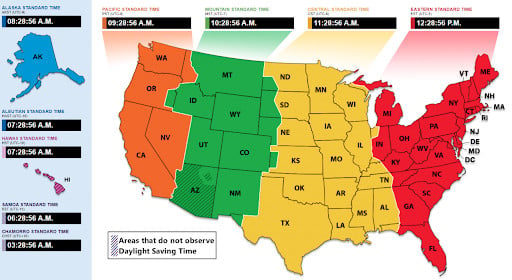
Whether you’re looking at a number (the hours and minutes displayed on your screen), or the name of the zone (e.g., “ET”, which could mean Eastern Standard or Eastern Daylight Time depending upon the current month/week/day/year) the “label” of the time zone matters just as much as the “number.” As such, players need to understand how they determine what time it is currently in the lobby they are playing in prior to determining if a given time zone label corresponds with the actual time displayed. This includes identifying whether the lobby utilizes:

- Their player’s computer/device time zone;
- A static server clock (i.e. the same exact time across all devices/platforms);
- UTC (Coordinated Universal Time);
- Some other U.S. time zones.
Players in Florida Must Consider Both Sides of the State When Converting Tournament Times
Florida has two separate time zones. South Florida (Miami, Fort Lauderdale, and West Palm Beach) observes Eastern Time while much of western Florida’s panhandle (e.g., Pensacola) observes Central Time. Because of this difference in time zones, two players in Florida could possibly get different answers as to what local time it will be during a given poker tournament.
When a player shares the beginning time for their next poker session and does not include a time zone; or if a group of players that includes players from multiple sides of the state share a reminder that was originally made using “Florida time”, there is no way to accurately translate the shared time into local time. If a player creates a manual reminder which clearly states “7 p.m. C.T. / 8 p.m. E.T.”, then it will prevent the other players within the group from copying the original reminder and displaying the incorrect time.
A Player Must Check for Troublesome Time Zones During Daylight Saving Time
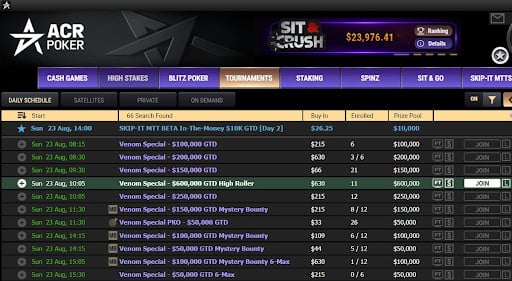
Players should always double-check the time zone used by a poker room before relying on a listed tournament start time. This is particularly important for international platforms such as ACR Poker, where players may be joining the same tournament from different U.S. time zones. Before setting a reminder, check which clock the poker client or tournament lobby uses and whether the displayed time has already been converted to your local zone.
Most of the United States observes daylight saving time (DST). For most states DST starts in March and ends in November. Most states set clocks one hour ahead at 2 AM on the second Sunday in March and move them back one hour at 2 AM on the first Sunday in November. Some areas are exempt from this rule; these include all of Hawaii and all of Arizona except the Navajo Nation. Therefore, there are some times during the year when the time difference between two people living in different parts of the US may change even though they did not travel.
Many devices update themselves, however, automatic updating does not mean that all reminders you’ve previously created will automatically adjust properly. If your OS is old, your time-zone settings are disabled, or you save a calendar entry with a fixed offset then you could see errors. UTC eliminates the seasonal change problem but players still need to convert from UTC to their local zone on the day of the event.
Converting Time Zone When Adding a Tournament to Your Schedule
Not converting the time zone until you are about to begin play can be an ambiguous process. This is why a basic planning routine can help:
- Read all of the details of your tournament. (you need to know) what date it starts; which zone (named); how long you have to register; and whether there has been a change to the scheduled start.
- Convert to the correct zone at the event date. Don’t assume that today’s difference in hours/minutes will still be the same as when you convert back to your local time.
- Verify everything again on the morning of your tournament. Make sure you check the schedule in the tournament lobby; the schedule for the saved calendar entry; and make sure your computer/device is set to use automatic network time.
- Plan ahead for prep time. Allow enough time for system updates; account checks; and establish a reliable internet connection prior to the start of the tournament.
If you are playing in a recurring tournament, you may want to double-check your schedule each year after both spring and fall daylight saving time transitions. If this is a one-time event, take a screen shot or write down the original time zone used so that if a web site gets changed during your preparations, you can restore it. While these are just common sense practices that don’t impact either your cards or your outcome, they certainly help avoid unnecessary scheduling mistakes.
When you understand time zones, you turn something that could be a vague tournament description into a solid plan. The trick is to always keep the three components together – date, zone, and daylight saving status.
Disclaimer
Artificial Intelligence Disclosure & Legal Disclaimer
AI Content Policy.
To provide our readers with timely and comprehensive coverage, South Florida Reporter uses artificial intelligence (AI) to assist in producing certain articles and visual content.
Articles: AI may be used to assist in research, structural drafting, or data analysis. All AI-assisted text is reviewed and edited by our team to ensure accuracy and adherence to our editorial standards.
Images: Any imagery generated or significantly altered by AI is clearly marked with a disclaimer or watermark to distinguish it from traditional photography or editorial illustrations.
General Disclaimer
The information contained in South Florida Reporter is for general information purposes only.
South Florida Reporter assumes no responsibility for errors or omissions in the contents of the Service. In no event shall South Florida Reporter be liable for any special, direct, indirect, consequential, or incidental damages or any damages whatsoever, whether in an action of contract, negligence or other tort, arising out of or in connection with the use of the Service or the contents of the Service.
The Company reserves the right to make additions, deletions, or modifications to the contents of the Service at any time without prior notice. The Company does not warrant that the Service is free of viruses or other harmful components.