
Americans are certain they can spot online scams, but new research suggests they might actually not be as good at it as they think.
Although nearly half of people recently surveyed by cybersecurity firm NordVPN said they were highly confident in their ability to recognize online fraud, a whopping 74% failed to identify a fraudulent website address designed to imitate a legitimate one. And 82% couldn’t recognize that two CAPTCHA prompts — the familiar pop-ups used to verify that you’re human — were fake.
Must Read
- Monitor public records, risky transactions and the dark web for your personal data without lifting a finger. Get a free 14-day trial of Aura today.
- You’re probably eligible to save money on car insurance. Compare rates for your ZIP code with this free — and fast — tool from Money.
- These 6 hacks can help seniors save money on things they’re already buying.
The findings come from an October report by NordVPN based on a nationally representative survey of 2,010 U.S. internet users ages 18 to 74.
The disconnect between confidence and actual cybersecurity knowledge could leave Americans vulnerable to increasingly sophisticated scams, particularly as fraudsters use artificial intelligence to create convincing messages, websites and other forms of deception designed to steal your money.

The survey found that 71% of respondents believe common sense alone is enough to protect them from online threats. Meanwhile, 51% admitted to reusing passwords or variations of them across multiple accounts, potentially exposing several accounts if that password is compromised.
So how good are you at recognizing online threats? Test your knowledge with the following six questions, adapted from NordVPN’s survey. Keep track of your answers and check your score at the end.
Can you spot these common cybersecurity threats?
The following six questions are taken directly from NordVPN’s survey, which tested respondents’ ability to distinguish legitimate websites, emails, advertisements and text messages from fraudulent ones. The questions also include examples of typosquatting and fake CAPTCHA prompts, two tactics scammers use to steal personal information or trick people into downloading malicious software.
See how many you can answer, then check whether you got them right at the end.
1. Below are two URLs. One is a “typosquatted” link (a web address that looks almost identical to the real one, but spelled slightly differently — for example, “arnazon.com” instead of “amazon.com”) designed to steal your banking password. Which one is the trap?

A) URL A
B) URL B
C) Both look legitimate
D) Neither is legitimate
E) I can’t tell the difference
2. Below are two landing pages. Which of these is the official site for a well-known brand?
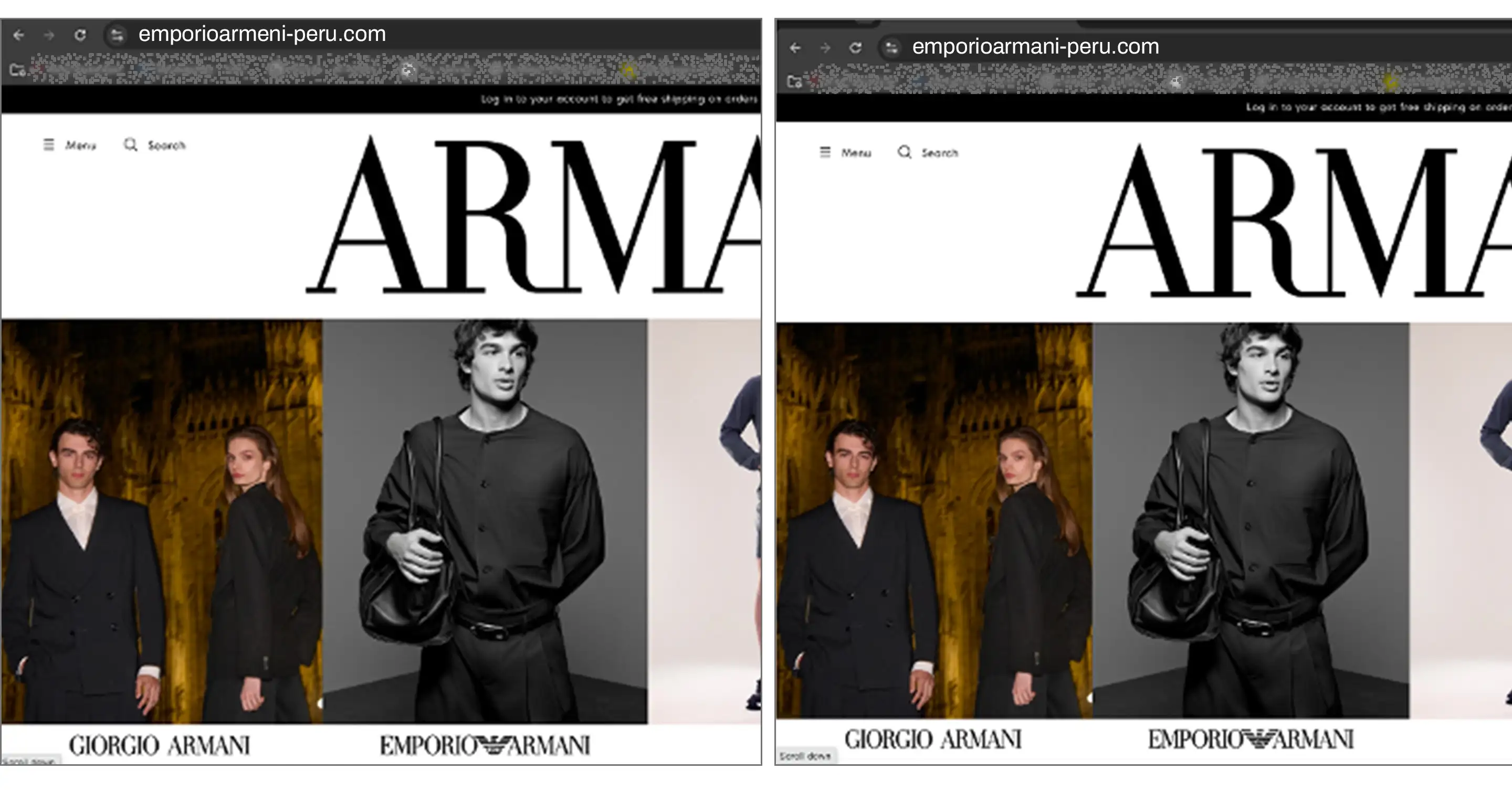
A) Page A
B) Page B
C) Both look legitimate
D) Neither is legitimate
E) I can’t tell the difference
3. Below are two emails, both asking you to verify an account. Which one is a phishing email?
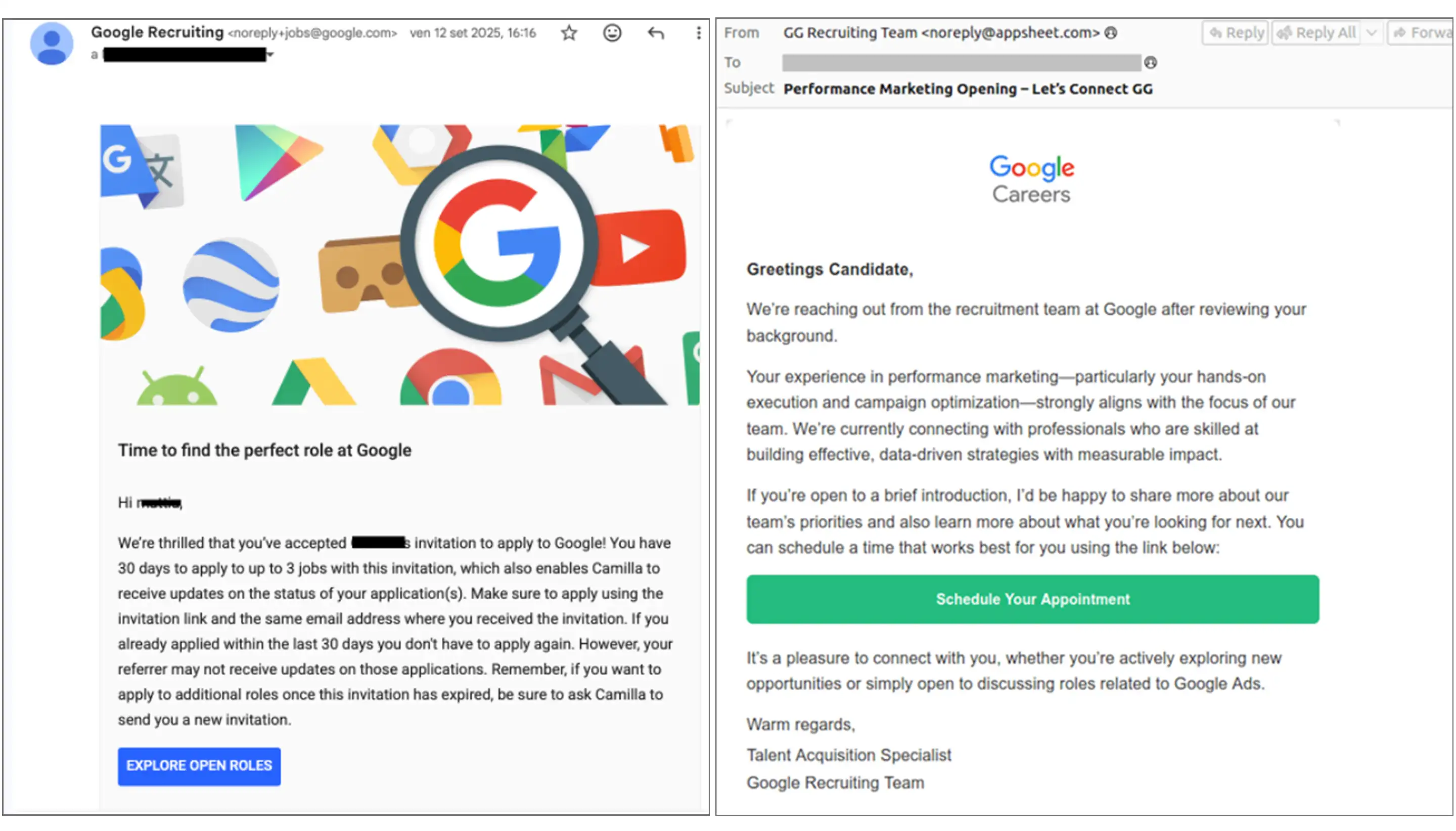
A) Email A
B) Email B
C) Both look legitimate
D) Neither is legitimate
E) I can’t tell the difference
4. Below are two product ads. One is from a real brand and one is from a fake e-commerce network. Which one is the scam?
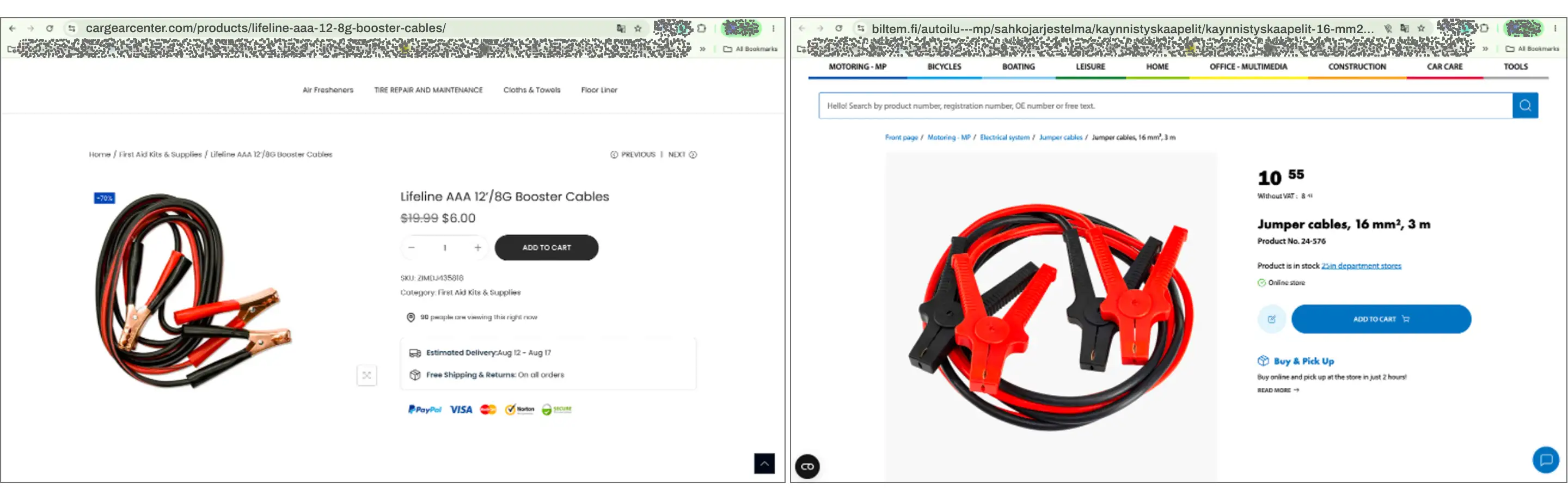
A) Ad A
B) Ad B
C) Both look legitimate
D) Neither is legitimate
E) I can’t tell the difference
5. Below are two SMS text messages. Which one is the scam?
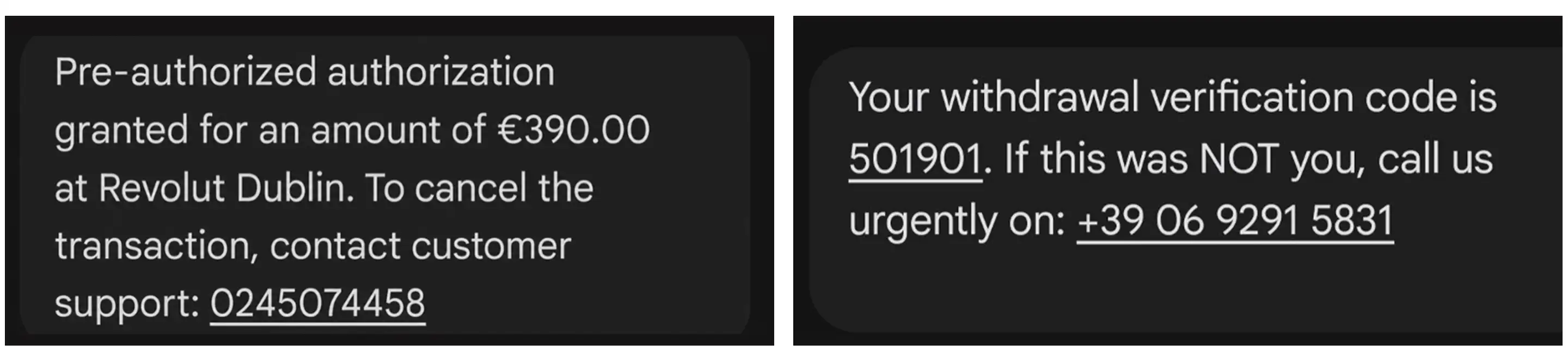
A) SMS A
B) SMS B
C) Both look legitimate
D) Neither is legitimate
E) I can’t tell the difference
6. Below are two “CAPTCHA required” pop-up messages. Which one is legitimate?
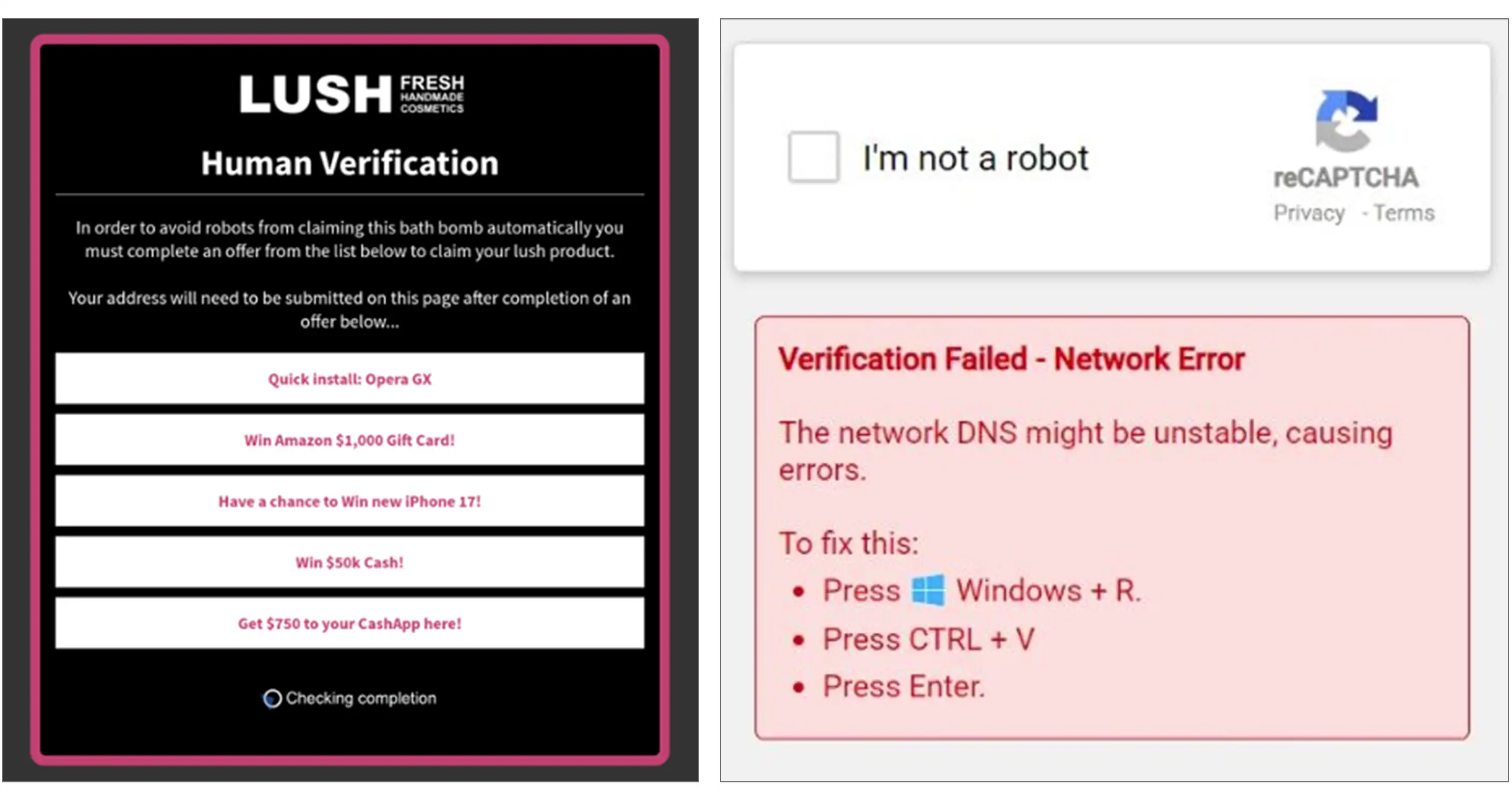
A) Option A
B) Option B
C) Both look legitimate
D) Neither is legitimate
E) I can’t tell the difference
The correct answers are B, D, A, A, C and D. How did you score?
To learn more about keeping your personal and financial data safe online, read Money’s guides on the most common text scams per state, the biggest holiday scams in 2026 and identity theft protection services.
Disclaimer
Artificial Intelligence Disclosure & Legal Disclaimer
AI Content Policy.
To provide our readers with timely and comprehensive coverage, South Florida Reporter uses artificial intelligence (AI) to assist in producing certain articles and visual content.
Articles: AI may be used to assist in research, structural drafting, or data analysis. All AI-assisted text is reviewed and edited by our team to ensure accuracy and adherence to our editorial standards.
Images: Any imagery generated or significantly altered by AI is clearly marked with a disclaimer or watermark to distinguish it from traditional photography or editorial illustrations.
General Disclaimer
The information contained in South Florida Reporter is for general information purposes only.
South Florida Reporter assumes no responsibility for errors or omissions in the contents of the Service. In no event shall South Florida Reporter be liable for any special, direct, indirect, consequential, or incidental damages or any damages whatsoever, whether in an action of contract, negligence or other tort, arising out of or in connection with the use of the Service or the contents of the Service.
The Company reserves the right to make additions, deletions, or modifications to the contents of the Service at any time without prior notice. The Company does not warrant that the Service is free of viruses or other harmful components.