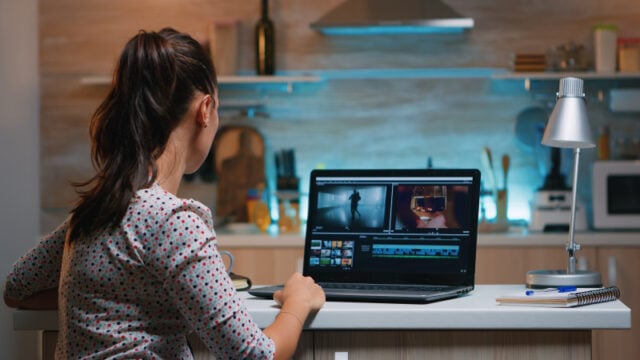
Some of the best stories are told through small moments rather than long explanations. A family celebration, a weekend trip, a school event, or a product launch can produce dozens of photographs and video clips. When these pieces are arranged thoughtfully, they can become a short film that captures the experience in a more engaging way. A montage video brings different scenes together to communicate a mood, highlight important events, or tell a complete story within a limited amount of time.
Creating a montage does not require professional filming equipment. With a clear idea, suitable footage, and a little attention to timing, anyone can turn ordinary recordings into a polished visual presentation.
What Is a Video Montage?
A video montage is a sequence of short video clips, photographs, and sometimes text or music combined to present a larger idea. Instead of showing every detail of an event, it focuses on selected moments that help viewers understand what happened or how an experience felt.

For example, a travel montage might show a train journey, local food, busy streets, and sunset views. Each clip represents a different part of the trip, but together they create a connected story.
Montages are commonly used for:
- Travel diaries and holiday memories
- Birthday celebrations and wedding highlights
- Business introductions and product presentations
- Sports highlights and training progress
- Educational projects and school presentations
- Social media videos and personal storytelling
The most effective montage is not necessarily the one with the most clips. It is the one in which every scene contributes something meaningful.
Why Montage Videos Work So Well
People receive information through both images and sound. A carefully edited montage combines these elements to create a more complete experience than a collection of unrelated recordings.
One important advantage is efficiency. A long event can be summarized in a short video without losing its most memorable moments. This makes montages useful for audiences who want to understand an experience quickly.
They also offer creative flexibility. A cheerful montage can use lively music and quick cuts, while a reflective video might use longer scenes, gentle transitions, and quieter audio.
Businesses can benefit from this format as well. Rather than presenting a product through a series of static images, a company can show its features, demonstrate how it works, and include customer experiences in a single video.
Planning a Montage Before Editing
A common mistake is to upload every available clip and begin editing without deciding what the final video should communicate. A little preparation makes the process easier and helps prevent the finished montage from feeling random.
Choose One Main Idea
Start by identifying the purpose of the video. Is it meant to celebrate an occasion, promote a service, document a journey, or explain a process?
A wedding montage, for instance, might focus on preparation, the ceremony, and the celebration afterward. A business montage might follow the journey from identifying a customer problem to demonstrating a solution.
Select the Best Footage
Review your photographs and recordings before adding them to an editing timeline. Look for clear images, useful action, different camera angles, and moments that support your main idea.
You can remove clips that are blurry, repetitive, or unrelated to the story. Selecting fewer strong scenes often produces a better result than including everything.
Establish a Logical Sequence
Even a short montage benefits from a beginning, middle, and ending.
| Section | Purpose | Example |
| Opening | Introduce the subject | A destination sign or event title |
| Main sequence | Show the important moments | Activities, people, and key highlights |
| Closing | Leave a final impression | A group photo or sunset scene |
This structure gives viewers a reason to keep watching and makes the video feel complete.
How to Make a Montage Video Online
Once your footage is organized, an online editor can help bring everything together. For people who prefer not to install desktop software, Clideo’s online video editor provides a browser-based workspace where video clips, images, text, and audio can be arranged on a multi-track timeline.
The process can be broken down into a few manageable steps.
Step 1: Upload Your Media
Collect the video clips, photographs, and audio files you want to use. Upload them to the editor and check that each file opens correctly.
It helps to rename files or arrange them in folders before uploading, especially when working with footage from multiple days or locations.
Step 2: Arrange the Clips
Place the selected material on the timeline in your preferred order. Move scenes around until the sequence feels natural.
For a travel montage, you might begin with the journey, move through the main activities, and finish with the most impressive view. For a product montage, show the product first and follow with its features and practical uses.
Step 3: Trim Unnecessary Sections
Remove long pauses, accidental camera movements, and repeated actions. Keep enough footage for viewers to understand what is happening, but avoid allowing any single scene to continue without a purpose.
Clideo offers editing controls for trimming clips, adjusting playback speed, and managing the placement of media elements.
Step 4: Add Music and Sound
Music can help establish the atmosphere of a montage. An energetic track may suit a sports highlight reel, while softer music might work better for a family memory video.
Keep the volume balanced, particularly when the original recordings contain conversations or useful environmental sounds. Make sure you have permission to use any music included in a video that will be published publicly.
Step 5: Include Text Where Necessary
Titles, dates, locations, and short captions can provide context without interrupting the visual flow.
For example, a travel montage might display the name of each destination, while a business video could use brief labels to identify product features.
Choose readable fonts and colors that contrast with the footage. Avoid filling every scene with text, as this can compete with the images.
Step 6: Review and Export
Watch the entire montage before exporting it. Check the transitions, audio levels, spelling, and order of the scenes.
Clideo allows users to prepare videos in different aspect ratios, making it possible to adapt a project for landscape, square, or vertical viewing. Choose the dimensions and export settings according to where the finished video will be shared.
Editing Techniques That Make a Montage More Engaging
A well-planned sequence provides the foundation, but a few editing techniques can make the final presentation more effective.
Match the pace to the subject. Quick cuts can create excitement in sports or event videos. Longer shots give viewers more time to appreciate landscapes, emotional moments, or detailed demonstrations.
Use transitions with a purpose. Simple cuts and occasional fades are often sufficient. Too many elaborate transitions can make a montage feel distracting.
Pay attention to music timing. Changing scenes around natural beats or musical changes can create a stronger sense of rhythm. However, the visual sequence should still make sense without relying entirely on the soundtrack.
Vary the shot types. Combine wide shots that establish a location with closer views that show expressions, details, or actions. This gives the montage more visual variety.
Maintain consistent colors. Footage recorded under different lighting conditions may look noticeably different. Small adjustments to brightness, contrast, or saturation can help the scenes feel more cohesive.
Finish with a meaningful image. The final scene should reinforce the video’s purpose rather than simply being the last file in the folder.
Common Montage Mistakes to Avoid
Even attractive footage can lose its impact when the editing is poorly organized. Keep these common problems in mind:
- Making the video too long: Remove scenes that repeat information or add little value.
- Choosing music that does not fit: The soundtrack should complement the subject and intended mood.
- Using inconsistent transitions: Repeatedly switching between different effects can make the video feel disjointed.
- Ignoring the viewing platform: Small text may be difficult to read on a phone, while an unsuitable aspect ratio may crop important details.
- Overusing slow motion: Slow motion works best when it emphasizes a meaningful action rather than extending every scene.
- Forgetting the original purpose: Every clip should support the central idea, whether that is entertainment, storytelling, or promotion.
Taking time to review these details can make the finished video more professional without adding unnecessary complexity.
Choosing the Right Online Editing Workflow
Different projects require different levels of control. A short personal montage may need only basic trimming, music, and a title. A promotional video might require several layers of footage, detailed text placement, and more careful sound adjustments.
Clideo can be a practical option for users who want to combine media through a web browser. Its editor supports multiple media elements, text customization, audio adjustments, and different video layouts. Because it works online, users can avoid installing a traditional desktop editing program.
However, an internet connection is needed for browser-based work, and large files may take additional time to upload or process. Export options, watermark policies, and some advanced features may depend on the selected plan. Checking these details before starting a large project can help avoid interruptions.
Final Thoughts
A memorable montage is created through thoughtful selection rather than complicated effects. The right clips, a clear sequence, suitable music, and consistent editing can turn scattered recordings into a story that people enjoy watching.
Whether you are preserving family memories, sharing a travel experience, presenting a business, or creating content for social media, start with a simple concept and build around the moments that matter most. With a browser-based tool such as Clideo, you can organize your media, refine the sequence, and prepare a finished montage without making the editing process unnecessarily complicated.
Disclaimer
Artificial Intelligence Disclosure & Legal Disclaimer
AI Content Policy.
To provide our readers with timely and comprehensive coverage, South Florida Reporter uses artificial intelligence (AI) to assist in producing certain articles and visual content.
Articles: AI may be used to assist in research, structural drafting, or data analysis. All AI-assisted text is reviewed and edited by our team to ensure accuracy and adherence to our editorial standards.
Images: Any imagery generated or significantly altered by AI is clearly marked with a disclaimer or watermark to distinguish it from traditional photography or editorial illustrations.
General Disclaimer
The information contained in South Florida Reporter is for general information purposes only.
South Florida Reporter assumes no responsibility for errors or omissions in the contents of the Service. In no event shall South Florida Reporter be liable for any special, direct, indirect, consequential, or incidental damages or any damages whatsoever, whether in an action of contract, negligence or other tort, arising out of or in connection with the use of the Service or the contents of the Service.
The Company reserves the right to make additions, deletions, or modifications to the contents of the Service at any time without prior notice. The Company does not warrant that the Service is free of viruses or other harmful components.