Hunting for holiday discounts can feel overwhelming, especially when lightning deals vanish in minutes. Fortunately, Amazon Alexa can monitor your favorite items and notify you before prices drop. With Black Friday and Cyber Monday sales running across late November, setting up automated alerts saves time and money.
Prepare Your Amazon Wish List
Alexa tracks sales using items saved in your Amazon account. Start by adding desired gifts, electronics, or household essentials to your Wish List, Cart, or Save for Later. Having a curated list ensures Alexa knows exactly which products to watch during peak shopping events.
Enable Shopping Notifications in the Alexa App
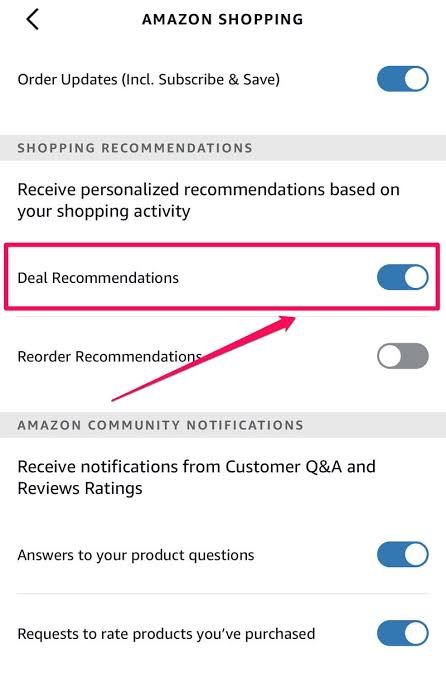
Next, make sure your Echo speaker can actually announce incoming sales.
- Open the Alexa mobile app on your smartphone.
- Tap More in the bottom right corner and select Settings.
- Choose Notifications, then tap Amazon Shopping.
- Toggle on Deal Recommendations under the shopping section.
Also check your phone’s main settings to confirm Amazon app notifications are allowed. When a deal goes live, your Echo device will chime and display a pulsing yellow light ring.

Use Voice Commands to Track Specific Products
You do not even need a screen to start tracking prices. With enhanced Alexa+ shopping features, you can set alerts using natural voice commands. Simply say, “Alexa, notify me when [product name] goes on sale”. You can also say, “Alexa, track the price of [product name]”.
Alexa can detect eligible deals up to 24 hours in advance. When your Echo glows yellow, ask, “Alexa, what are my notifications?” to hear your personalized deal roundup.
Automate Purchases with Prime
Prime members can take holiday convenience one step further with Auto Buy. When Alexa alerts you to an upcoming sale, you can ask the assistant to purchase the item automatically. Just keep in mind that digital coupons and special promotional codes do not apply to automated voice orders.
By combining Wish Lists with Alexa voice alerts, you can snag top holiday bargains without constantly refreshing browser tabs.
Disclaimer
Artificial Intelligence Disclosure & Legal Disclaimer
AI Content Policy.
To provide our readers with timely and comprehensive coverage, South Florida Reporter uses artificial intelligence (AI) to assist in producing certain articles and visual content.
Articles: AI may be used to assist in research, structural drafting, or data analysis. All AI-assisted text is reviewed and edited by our team to ensure accuracy and adherence to our editorial standards.
Images: Any imagery generated or significantly altered by AI is clearly marked with a disclaimer or watermark to distinguish it from traditional photography or editorial illustrations.
General Disclaimer
The information contained in South Florida Reporter is for general information purposes only.
South Florida Reporter assumes no responsibility for errors or omissions in the contents of the Service. In no event shall South Florida Reporter be liable for any special, direct, indirect, consequential, or incidental damages or any damages whatsoever, whether in an action of contract, negligence or other tort, arising out of or in connection with the use of the Service or the contents of the Service.
The Company reserves the right to make additions, deletions, or modifications to the contents of the Service at any time without prior notice. The Company does not warrant that the Service is free of viruses or other harmful components.