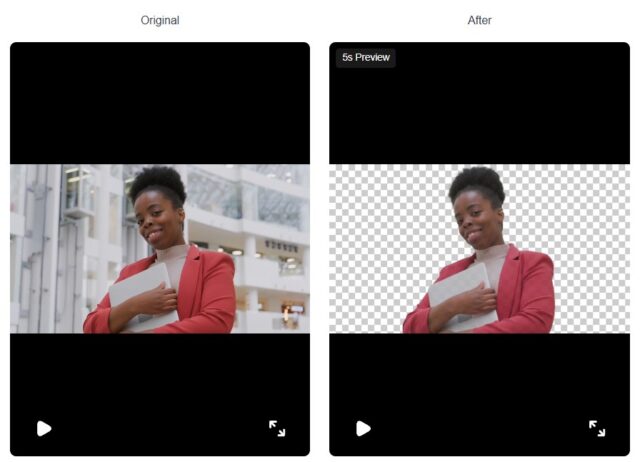
Did you know that most of the clean, studio-quality videos you see online today aren’t shot in studios? They are the result of incredibly smart AI working behind the scenes. These video background removal tools do more than just spot the subject and trim away the backdrop. They interpret every pixel, read motion patterns, and understand visual depth almost like a human eye would.
AI can separate fine hair strands with impressive precision. They also deal with quick movements, reflections, and tricky color areas far better than older techniques. Traditional green screens often struggle with these details; however, modern AI enables the creation of polished, studio-quality content. And this without needing an actual studio setup.
In this article, we’ll dive into how AI removes a video’s background in detail. Also, we will study why tools like Vmake stand out with their superior detail fidelity, color accuracy, and handling of complex elements. Let’s break down.
Why Does AI Background Removal Matter?
Earlier, removing background from videos used to require a green screen or chroma key setup. This approach worked only under controlled conditions such as even lighting, contrasting colors, and a plain backdrop. However, today’s creators record in regular, everyday spaces. Bedrooms, offices, kitchens, outdoors, or even on the go, to name a few.

AI background removal fills this gap by enabling:
- Cleaner, distraction-free videos
- Consistent branding
- Better storytelling
- Professional quality without studio setups
- Flexibility to repurpose content across platforms
From YouTubers to virtual presenters to online coaches and businesses, the demand for automated background removal has become universal.
How AI Actually Removes a Video’s Background
Background removal with AI goes beyond basic cutouts. It involves detailed segmentation, motion understanding, color accuracy, and smooth frame-to-frame transitions.
Below is the breakdown of how AI actually processes these details.
Frame-by-Frame Pixel Segmentation
A video is made of frames or images displayed rapidly in sequence. AI begins by analyzing each frame individually.
Using deep learning algorithms (typically convolutional neural networks or CNNs and segmentation models), the system classifies every pixel into:
- Foreground (the subject)
- Background (everything else)
This process includes:
- Semantic segmentation: recognizing object categories like “person,” “hair,” “clothing,” “hand,” and “face.”
- Instance segmentation: separating different subjects when more than one person or object is present.
- Matting: refining edges around fine details to avoid harsh cut-outs.
Elements that are soft, airy, or transparent, like hair, fur, lace fabric, veils, and smoke, are challenging to isolate. Advanced AI tools use real-world scenarios to segment these details.
Temporal Analysis to Avoid Flicker and Ghosting
A common assumption is that background removal only involves removing the area around the subject. The real challenge in videos is to keep the cutout steady even when the person is moving around. If AI processes each frame independently, edges can flicker or shift slightly. That’s when you get those shaky outlines often noticed in low-quality edits.
To prevent this, modern AI doesn’t work frame by frame. It looks at the motion happening throughout the video. It follows the subject’s movements and uses a set of intelligent tools to ensure smooth, consistent results, like:
- Optical flow which follows how each pixel moves from one frame to the next.
- Motion vector prediction to guess where the subject is moving.
- Frame-to-frame smoothing to maintain stability of the edges and reduce jitter.
- Mask refinement, where the AI fine-tunes the cutout using information from neighboring frames.
This ensures the background removal stays consistent throughout.
Understanding Depth and Complex Scenes
Real videos are messy. Movement, lighting changes, and overlapping objects are common in these video scenes. All these make background removal tougher than it seems.
To handle these situations, AI tries to understand the scene in a deeper way instead of just guessing what’s in front. It does this by using techniques like:
- Depth estimation: to figure out what’s close to the camera and what’s farther away.
- Occlusion reasoning: to learn when parts of the subject are hidden for a moment.
- Foreground probability modelling to decide which areas most likely belong to the subject, even in difficult lighting or busy spaces.
Preserving Color, Lighting & Texture
Now the AI must also protect the subject’s original colors, lighting, and fine textures. In its absence, skin tones may shift, clothes can look washed out, and edges may appear too sharp or artificial.
So, to keep everything looking real, AI uses a mix of techniques that maintain the footage’s natural feel.
- Color constancy keeps skin tones and clothing shades accurate even after the background changes.
- Edge-aware matting prevents halos or harsh outlines around hair, hands, and detailed edges.
- Texture-preserving networks protect small details like hair strands, fabric patterns, and shadows.
- Lighting harmonization ensures the subject blends naturally with the new background.
- Frame-to-frame color stability helps avoid sudden shifts or flickering in skin tone or brightness.
Final Rendering & Background Replacement
Once the subject is fully isolated, the tool can output:
- Transparent background video
- A video with a new background image
- A video with a custom color
- A video with an AI-generated or stock background
This final stage ensures resolution, sharpness, and audio sync remain intact.
What Sets Vmake Apart in AI Video Background Removal
When you’re choosing an AI background removal tool, the real difference isn’t just how fast it works. It lies in how good the final video looks. That’s where Vmake really stands out.
Instead of simply cutting out the background, it pays attention to the small things that creators actually care about. These may include clean edges, natural colors, and how well the video blends together.
Here’s why you should use Vmake to remove background from video.
- Strong detail fidelity around hair strands, fabric edges, and fast movements, so the subject never looks cut-out or blurry.
- Great handling of complex elements. This includes busy rooms, uneven lighting, overlapping objects, and outdoor scenes with motion.
- Consistent color accuracy. Vmake advanced AI keeps skin tones and clothing shades natural instead of dull or overly bright.
- Better lighting balance. It ensures the subject blends smoothly with new backgrounds without looking artificially placed.
- Texture preservation helps maintain the natural look of hair, skin, and clothing, even after the background is replaced.
- Quick processing makes it easier for creators to get polished results with minimal effort.
Common Challenges in Background Removal
There are times when even the AI background removal tools aren’t effective. By learning the reasons behind it, you will know what to expect and how to get better results.
Here are the issues:
- Quick motion makes the edges blur or wobble.
- Low light scenes make it tough for the AI to figure out where things end.
- See through objects like glass, thin clothes, or sheer curtains are tricky to cut out.
- Shiny or reflective surfaces throw the AI off because they bounce back light and images.
- Crowded scenes with lots of people or cars moving around confuse the system.
- Similar colors. When you and the background look alike, the AI struggles to tell them apart.
Conclusion
Anyone can perform professional-quality video editing with advanced AI background removal tools. There is no need to worry about complicated setups or hours of manual work. This smart technology can handle details such as color accuracy, lighting, and fine textures with impressive precision.
Vmake demonstrates how advanced this technology has become, delivering clean, natural, and consistent results even in complex scenes. And with a watermark remover video online free tool, the editing process becomes even smoother.
Disclaimer
Artificial Intelligence Disclosure & Legal Disclaimer
AI Content Policy.
To provide our readers with timely and comprehensive coverage, South Florida Reporter uses artificial intelligence (AI) to assist in producing certain articles and visual content.
Articles: AI may be used to assist in research, structural drafting, or data analysis. All AI-assisted text is reviewed and edited by our team to ensure accuracy and adherence to our editorial standards.
Images: Any imagery generated or significantly altered by AI is clearly marked with a disclaimer or watermark to distinguish it from traditional photography or editorial illustrations.
General Disclaimer
The information contained in South Florida Reporter is for general information purposes only.
South Florida Reporter assumes no responsibility for errors or omissions in the contents of the Service. In no event shall South Florida Reporter be liable for any special, direct, indirect, consequential, or incidental damages or any damages whatsoever, whether in an action of contract, negligence or other tort, arising out of or in connection with the use of the Service or the contents of the Service.
The Company reserves the right to make additions, deletions, or modifications to the contents of the Service at any time without prior notice. The Company does not warrant that the Service is free of viruses or other harmful components.