
A rainy holiday weekend in South Florida can be the perfect window to finally work on the novel you keep putting off. You open an AI writing tool, ask for chapter nine, and the detective who died in chapter three strolls back into the scene. That is the real problem with long AI fiction: the tool holds plenty of words but loses track of the world. A bigger prompt will not fix it; a story bible that feeds each scene only the canon it needs will. Here are seven platforms that do that well, so your story stays consistent from page one to “The End.”
Quick Answer: The Best Tools for Story-Bible Writers
Need the verdict fast? You’re in the right spot. The snapshot below shows where each platform shines, how it injects canon, and the red flag to notice before you pay. Prices can shift, so confirm within 48 hours.
| Rank | Tool | Best for… | Story-bible tech | Published context limit | Entry price* | Key caution |
| 1 | DreamGen | Multi-character narrator + NPC scenes | Scenario Codex | Up to 30,000 tokens | Entry tier | Credit use varies by model |
| 2 | Novelcrafter | Fine-grained canon, BYO models | Codex + Progressions | Model-dependent | $8 / month Hobbyist | API + model setup time |
| 3 | Sudowrite | Guided prose polish | Story Bible + Chapter Continuity | Not published | $10 / month | Credit cost varies by model |
| 4 | NovelCanon | Early contradiction sweeps | Auto-generated Story Bible | Model-dependent | $7 / month | Few independent case studies |
| 5 | NovelAI | Power-user keyword lorebooks | Lorebook + Memory slots | Not published | $10 / month Tablet | Manual timeline upkeep |
| 6 | Pendraic | BYOK long-novel workspace | Story Index + World Builder | Model-dependent | $14.99 / month Essentials | No live co-authoring yet |
| 7 | Squibler | Rapid first-draft output | Story Elements board | Not disclosed | $29.99 / month Plus | Context limit unpublished |
*Cheapest paid plan, billed monthly unless noted. Verify currency and taxes at checkout.

In a rush? DreamGen’s Scenario Codex slips the right lore into each scene with minimal setup. Novelcrafter follows for authors who want surgical retrieval rules, and Sudowrite offers the slickest “make it sing” prose help. The rest rank by how well they juggle continuity, cost, and collaboration.
Why a Story Bible Beats a Giant Prompt
A context window is only storage. It isn’t memory. Fill that window with a 10,000-word prompt and the model trims newer scene cues to make space.
DreamGen’s Scenario Codex shows this in practice: it stores every scar, heirloom, and alias in a wiki-style database, then auto-injects only the snippets a scene actually calls for. Because the Codex sits beside a 30,000-token context window on the Pro tier, you keep headroom for fresh prose while still safeguarding canon.
Bottom line: choose tools that fetch the right snippet at the right moment, not ones that brag about million-token capacity. Your future self and your readers will appreciate the discipline.
How We Chose the Winners
Here’s the scoring lens we used: six factors, each with a fixed weight.
| Criterion | Weight (percent) | What we measured |
| Story-bible integration | 30 percent | Can the tool store, update, and inject canon automatically? |
| Continuity architecture | 25 percent | Selective retrieval, timeline logic, and what gets evicted when tokens run tight |
| Writer control & multi-character handling | 15 percent | Scene steering, narrator roles, inspectable context, character management |
| Fiction fit & creative flexibility | 10 percent | Beats, arcs, genre presets: features built for novelists, not marketers |
| Workflow maturity & usability | 10 percent | Documentation, onboarding smoothness, release history |
| Value & exit options | 10 percent | Manuscript plus bible export, pricing clarity, lock-in risk |
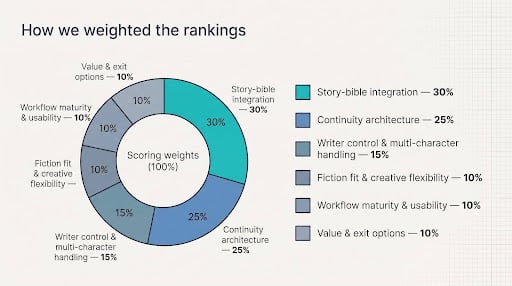 We scored each platform against these benchmarks using current docs, demos, and release notes, then ranked the top seven that you’ll meet next.
1. DreamGen: Best Overall for Story-Bible-First, Multi-Character Fiction
DreamGen starts where novelists start: cast, canon, then model. A new project opens with the Scenario Wizard, which captures people, places and key plot threads. For a wider view of the field, see DreamGen’s guide to the best AI story generators for fiction writers. Those details flow into the Scenario Codex, a live database that slips only the relevant shard into each prompt, for example, a fresh scar or missing heirloom.
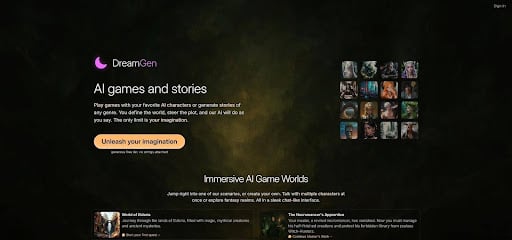
Screenshot: DreamGen Scenario Wizard and Scenario Codex Interface
Switch to Story Writing Mode and you direct the narrator while non-player characters obey or conceal facts according to the Codex. Role-Play Mode reuses the same world for solo or multiplayer brainstorming without breaking continuity.
Why it tops our list: fast setup, reliable retrieval within a 30,000-token context window on the Pro tier, and naturally blocked multi-character scenes that feel like stage directions rather than prompt gymnastics.
Pricing: an entry tier plus the Starter, Advanced and Pro tiers.
2. Novelcrafter: Best for Granular Canon and Model Control
If you color-code sticky notes yet still need more precision, Novelcrafter delivers. Its Codex works like an editable wiki: every character, place, or object gets aliases, relationships, and mention tracking. You can schedule a fact to appear only after chapter twelve or hide a spoiler until the protagonist discovers it. Progressions push the idea further by unlocking new canon entries as milestones fire, acting more like a stage manager than a static prompt.
On the engine side, you can connect OpenAI, Anthropic, Google, or any OpenRouter model, and even run local checkpoints through LM Studio or Ollama. Swap models mid-draft, pay only for the compute you use, and keep every Codex rule intact.
Trade-offs: setup takes time. You’ll juggle API keys, usage caps, and single-user collaboration. AI features start at $8 per month on the Hobbyist plan, plus provider costs. For authors who need surgical control over lore, that extra effort often pays off.
3. Sudowrite: Best for Fiction-Tuned Prose and Guided Drafting
Sudowrite aims to feel like a live editor. Its Muse model scores high on sensory detail and rhythm, so early drafts read more like polished prose than raw scaffolding.
The headline feature is Story Bible. After you set genre, tone, characters, and world rules, you can link earlier chapters with Chapter Continuity.
Workflows stay bite sized: Describe for imagery, Expand for the next beat, Rewrite for tone shifts. Credits are the currency; the rate is lower for standard models and higher for Muse or Anthropic. When context fills, Sudowrite drops lower-priority bible notes first, so intricate lore may need manual pinning. Exports arrive as DOCX or a zipped folder (chapter metadata travels separately). Entry pricing starts at $10 per month.
4. NovelCanon: Best for Contradiction Checking
NovelCanon hunts plot holes before readers can spot them. Import a draft and it re-creates a Story Bible, listing every character, rule, thread, and timestamp it detects. On the Pro tier, one click launches a full-manuscript audit for broken rules, missed pay-offs, and “who knew what when” errors.
You get plain-language notes that you can accept or ignore. The app never rewrites text on its own. Because it connects to OpenAI, Anthropic, or any OpenRouter model, you can match scan depth to your budget.
Trade-offs: real-time collaboration is still on the roadmap, UI polish trails older rivals, and you will draft prose elsewhere. Pricing starts at $7 per month for the Manuscript plan and $15 per month for Pro (model usage billed separately). If early contradiction sweeps matter more than in-app writing, NovelCanon earns its slot.
5. NovelAI: Best for Lorebook Power Users
NovelAI hands you granular control. In the Lorebook, you tag a keyword, trigger phrase, or even a regex that pulls a full character dossier into context on demand. Above that sit Memory and a shorter Author’s Note, which keep core facts traveling with your live prose.
Transparency leads the feature list: click Show Context to inspect every lore entry, system note, and beat the model receives. Adjust a rule, regenerate, and compare. You see clear cause and effect with no hidden steps.
Caveats: you curate updates yourself, timeline shifts are manual. Pricing starts at $10 per month for the Tablet plan. If you enjoy fine-tuning and don’t mind housekeeping, NovelAI pays off.
6. Pendraic: Best BYOK Long-Novel Workspace
Want to bring your own AI key? Pendraic puts data sovereignty and model choice first. Connect your own API key and it writes, indexes, and stores your saga while you pay the provider directly, with no markup and no surprise usage caps.
Inside, the Story Index tracks characters, open threads, and beat plans, and the World Builder keeps lore and geography separate from prose. Because it is a browser-based workspace, your files sync to the cloud under your login and remain portable as Word or Markdown exports.
Model choice is flexible: connect your own Claude or ChatGPT account. Capacity then follows the provider you pick.
Trade-offs: real-time co-authoring is still on the roadmap, and the interface shows early-stage polish. Pricing starts at $14.99 per month for the Essentials web plan (a free tier is also available). If granular control and BYOK top your wish list, Pendraic delivers.
7. Squibler: Best for Generating a Fast Full Draft
Need a quick first pass? Squibler can outline chapters, scenes, and beats in one click. Story Elements cards for characters, locations, and plot points sit beside the manuscript, so you can adjust canon without endless scrolling.
Speed comes with opacity: the vendor does not publish its underlying model or context ceiling, which means you trade transparency for pace. If your draft needs surgical continuity, the hidden window could drop vital lore. For NaNoWriMo-style sprints, built-in collaboration links, and PDF or DOCX export keep momentum high.
Pricing starts at $29.99 per month for the Plus plan (Pro is $89.99). EPUB export appears on some help pages but not others, so confirm that format and any context limit before subscribing.
What About Claude, ChatGPT, AI Dungeon and SillyTavern?
AI Dungeon
Plot Essentials, Story Cards, and a Memory Bank capture characters, settings, and running summaries, while each membership tier sets a base context length that some models let you extend with credits. The core experience is interactive adventure: you type an action, the AI reacts, and the loop continues.
Exports arrive as ZIP archives containing HTML and JSON, so you need extra cleanup before novel formatting. Pricing starts around $14.99 per month for the Journey plan, with larger windows and premium models at higher tiers. If you are writing branching quests or multiplayer stories, AI Dungeon shines. For a linear manuscript, expect added editing work.
SillyTavern
SillyTavern is an open-source interface you can pair with almost any cloud or local model. Configure global or per-character Lorebooks, set insertion rules, and decide exactly what reaches the prompt. Because context length hinges on the model you attach, whether that is a 13-billion-parameter local Llama or a 1-million-token Claude Sonnet, the ceiling is whatever your backend supports.
Cost is 0 for the software; you supply the hardware or API keys. The trade-off is complexity: installing dependencies, forwarding ports for group chats, and fine-tuning tokens can feel like running a small game server. If you enjoy tinkering and want maximum privacy, SillyTavern excels. If you prefer turnkey drafting, the seven ranked platforms remain lighter lifts.
Claude and ChatGPT
Both assistants can ingest large project files. Both now advertise very large context windows. They treat those uploads as static references, not an evolving story bible. You still choose the authoritative document, update it manually, and re-prompt as the plot changes. They are excellent for brainstorming, research, or polishing prose, and less reliable for scene-by-scene continuity.
Expert Evidence: Context Is Not the Same as Memory
Researchers keep flagging the same flaw in long-form generation: models store plenty of text yet recall the wrong facts.
- Lost in Stories (2026) examined 2,000 narrative prompts and found that consistency errors were most common in factual and temporal details and tended to appear around the middle of the narrative (Li et al., 2026).
- Topo-Narrator split memory into a Character Graph, Plot Chain, and Environment Tree and generated stories averaging 13,000 words. It outperformed strong baselines on consistency metrics (Chen et al., 2026).
The takeaway is clear: selective, structured recall beats a single, gigantic prompt. That lesson drives our ranking because tools that store canon in discrete fields and fetch only what the current scene needs outrank those that simply widen the token window.
A 10-Minute Test for Your Own Story Bible
Before you pick a platform, run this quick stress test. In minutes, it uncovers issues that months of drafting might hide.
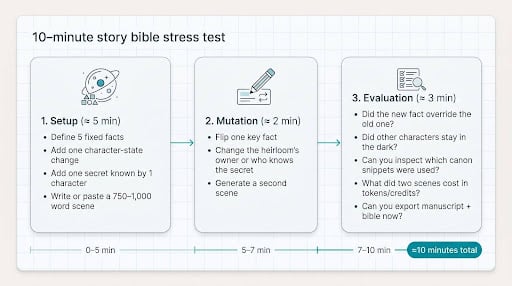
Setup (≈ 5 minutes)
- Create a tiny universe: five fixed facts, one character-state change, and one secret known by a single character.
- Add those details to the tool’s bible, lorebook, or codex.
- Write or paste a short scene and ask the AI to generate 750-1,000 words.
Mutation (≈ 2 minutes)
- Change one fact: swap the heirloom’s owner or let a new character learn the secret, then request a second scene of similar length.
Evaluation (≈ 3 minutes)
- Did the new fact override the old one without extra prompting?
- Did characters who should not know the secret stay in the dark?
- Can you inspect which canon snippets entered the prompt?
- What did the two scenes cost in tokens or credits? (Tip: note the count shown by the interface.)
- Can you export both the manuscript and the bible right now?
If the tool aces all five questions, your novel stands a better chance of staying consistent and affordable.
Frequently Asked Questions
Can an AI Write an Entire Novel From One Prompt?
Yes. Large-context models can spit out 50,000-plus words in a single run. But fluent text is not the same as a coherent manuscript. Long windows still drop or distort facts as drafts grow. Break the work into scenes, keep a live story bible, and revise like any human-crafted book.
Is a Larger Context Window the Same as Better Memory?
No. A big window only defines what can be sent at once. Real memory relies on selective retrieval, ordering, and the ability to let new canon override old notes. Structured bibles beat giant prompts every time.
Which Tool Is Best for Multiple Characters?
- DreamGen for hosted narrator plus NPC role-play
- Novelcrafter for granular control with local or cloud models
- AI Dungeon for interactive branching adventures
- SillyTavern if you are comfortable wiring everything yourself
Can I Publish and Copyright an AI-Assisted Novel?
In the United States, only the human-authored expression is copyrightable. The U.S. Copyright Office confirmed this in its January 29 2025 report. Amazon requires disclosure of AI-generated text when you publish through Kindle Direct Publishing. Brainstorming or light edits are usually “AI-assisted” and need no extra disclosure, but generated prose that remains in the book does. This is general information, not legal advice.
What Does AI Cost Over a Full Novel?
Most platforms start near $10 per month. Add model usage fees, which vary by provider and model. Run the 10-minute test above and note actual credit burn before you commit.
How Do I Move My Story If I Leave a Tool?
Look for DOCX or Markdown export for the manuscript, and CSV or JSON for the bible. If both exist, migration is a copy-paste job. If the bible sits in a closed database, your canon is locked too, so factor that into your choice.
Conclusion
Architecture beats raw capacity. DreamGen leads for story-bible-first worlds, Novelcrafter excels at surgical canon control, and Sudowrite shines for line-level polish. NovelCanon, NovelAI, Pendraic, and Squibler each solve a different headache: contradictions, power-user tweaking, local sovereignty, or rapid drafting.
Before you subscribe, run the five-question stress test, note real token cost, and confirm export formats. A tool that safeguards your lore today will still have your back at chapter forty.
Disclaimer
Artificial Intelligence Disclosure & Legal Disclaimer
AI Content Policy.
To provide our readers with timely and comprehensive coverage, South Florida Reporter uses artificial intelligence (AI) to assist in producing certain articles and visual content.
Articles: AI may be used to assist in research, structural drafting, or data analysis. All AI-assisted text is reviewed and edited by our team to ensure accuracy and adherence to our editorial standards.
Images: Any imagery generated or significantly altered by AI is clearly marked with a disclaimer or watermark to distinguish it from traditional photography or editorial illustrations.
General Disclaimer
The information contained in South Florida Reporter is for general information purposes only.
South Florida Reporter assumes no responsibility for errors or omissions in the contents of the Service. In no event shall South Florida Reporter be liable for any special, direct, indirect, consequential, or incidental damages or any damages whatsoever, whether in an action of contract, negligence or other tort, arising out of or in connection with the use of the Service or the contents of the Service.
The Company reserves the right to make additions, deletions, or modifications to the contents of the Service at any time without prior notice. The Company does not warrant that the Service is free of viruses or other harmful components.