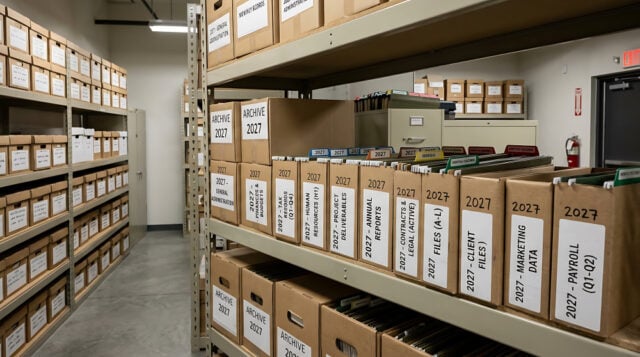
The furniture is gone, the phones have been disconnected, and the lease is finished. Yet one room remains crowded with boxes. Inside are contracts signed years ago, employee files, invoices, and project records that nobody has reviewed in months. Closing an office may end the need for its physical space, but it does not end the company’s responsibility for the information left behind.
The difficult decisions are not about moving boxes. They concern which records still matter, who needs them, and what can be destroyed without creating problems later. A sensible closure plan treats those questions as part of the move, rather than leaving them until the final week.
Six weeks before closing: Find out what is actually there
Start with an inventory, not a dumpster. Department managers should identify the records in their care and separate active files from archives. Payroll information, signed agreements, tax documents, and client correspondence may have different retention periods. Some records may also be subject to an audit, investigation, or legal hold that prevents routine disposal.
An inventory does not need to describe every sheet of paper. It should, however, identify each box or collection, its general contents, the period it covers, and the person responsible for approving its next destination. This record makes the decisions that follow easier to explain and verify.

At this stage, companies discover three categories of material:
- Records needed for ongoing work, which must follow employees or move to another office.
- Records that are seldom requested but still require secure retention.
- Records whose retention periods have ended and that may qualify for authorized destruction.
The third category deserves careful review. A document that looks outdated is not necessarily eligible for disposal, particularly if it relates to an unresolved dispute.
Two weeks before closing: Decide what moves and what ends
Once the inventory is approved, assign each category a destination. Active files can be transferred to an operating location or scanned into a controlled document system. Archives may be sent to offsite storage with an index that allows individual boxes to be retrieved later. Paper records that are no longer required should enter a documented destruction process.
Location matters when a business operates across several offices. Consider a company consolidating its California footprint. Its San Francisco team may transfer current customer contracts to headquarters, while an Oakland branch sends older accounting files to secure storage. In Santa Clara, managers may sort technical project folders from earlier product launches before vacating their workspace. For its South Bay office, document shredding in San Jose may be the practical way to dispose of approved paper records rather than transporting unnecessary files to another site.
The important distinction is between moving information and eliminating it. Shredding should follow a retention decision, never replace one. The same principle applies to scanning: creating a digital copy does not automatically mean the original can be discarded. Applicable rules and business needs determine whether paper must remain available.
Collection and transfer procedures also need attention. Confidential records should be packed in identified containers, handled by authorized personnel, and tracked during transportation. Businesses should retain receipts, transfer logs, and certificates of destruction for the work performed.
After the keys are returned: Keep the trail intact.
The closed office can still accept requests for employee files, contracts, or other supporting documentation in the case of an audit. Somebody in the new company will have to know what has happened to these files, how to retrieve them, and whether anybody is authorized to access them. Thus, the inventory has to be kept open after the move, along with vendor contact information and documentation about disposal. There should be a different checklist for technology. Even old copiers, printers, laptops, and storage devices can keep confidential data and should be checked and sanitized or destroyed before resale or any other disposal.
A follow-up review can confirm that every box has a recorded destination and every destruction request has been completed. It can also reveal files that were misplaced or responsibilities that were never assigned.
Frequently asked questions
Can a business destroy all its documents when an office closes?
No. Even when the place closes down, the retention requirement and preservation obligation remain relevant. The considerations must take into account the type of documents as well as other factors.
Should every record be scanned before the move?
Not always. Digitization will work well for frequently used documents, but it may not be necessary for documents that just need to be kept and are seldom used.
Who should oversee the process?
The designated records coordinator will coordinate with the department heads and legal counsel to make sure that documentation is completed for all transfers and destructions. The office closeout is done successfully if its information is assigned to its rightful destination. This could be use, storage, or destruction of information.
Disclaimer
Artificial Intelligence Disclosure & Legal Disclaimer
AI Content Policy.
To provide our readers with timely and comprehensive coverage, South Florida Reporter uses artificial intelligence (AI) to assist in producing certain articles and visual content.
Articles: AI may be used to assist in research, structural drafting, or data analysis. All AI-assisted text is reviewed and edited by our team to ensure accuracy and adherence to our editorial standards.
Images: Any imagery generated or significantly altered by AI is clearly marked with a disclaimer or watermark to distinguish it from traditional photography or editorial illustrations.
General Disclaimer
The information contained in South Florida Reporter is for general information purposes only.
South Florida Reporter assumes no responsibility for errors or omissions in the contents of the Service. In no event shall South Florida Reporter be liable for any special, direct, indirect, consequential, or incidental damages or any damages whatsoever, whether in an action of contract, negligence or other tort, arising out of or in connection with the use of the Service or the contents of the Service.
The Company reserves the right to make additions, deletions, or modifications to the contents of the Service at any time without prior notice. The Company does not warrant that the Service is free of viruses or other harmful components.